Services
What we build and what we fix
We automate procurement and finance, automate the work your sales and operations teams repeat, build the software your business needs, and fix apps that were built too fast with AI tools. Pick the one that sounds like you, or tell us what is slowing you down.
Which one do you need?
Pick the sentence that sounds like you. Each one jumps to its section.
My sales or operations team spends hours every week on work a computer could do.
We approve purchases in chats, compare quotes by hand and pay invoices we cannot check.
We chase invoices, match bank lines and close the month by hand.
I need software built around how my business works.
I built an app with an AI tool and I am not sure it is safe.
I want a person to read the code and tell me what is unsafe.
I know my app is broken and I want it fixed properly.
My app works today and I want it to stay that way.
I want something watching my app all the time, and someone to call when it breaks.
Four for procurement teams
Buying goes wrong in the gaps between people: a request in a chat, a quote in an email, a delivery nobody recorded, an invoice that arrives weeks later. These close the gaps, and a person approves every order and every payment.
Purchase requests and LPO approvals
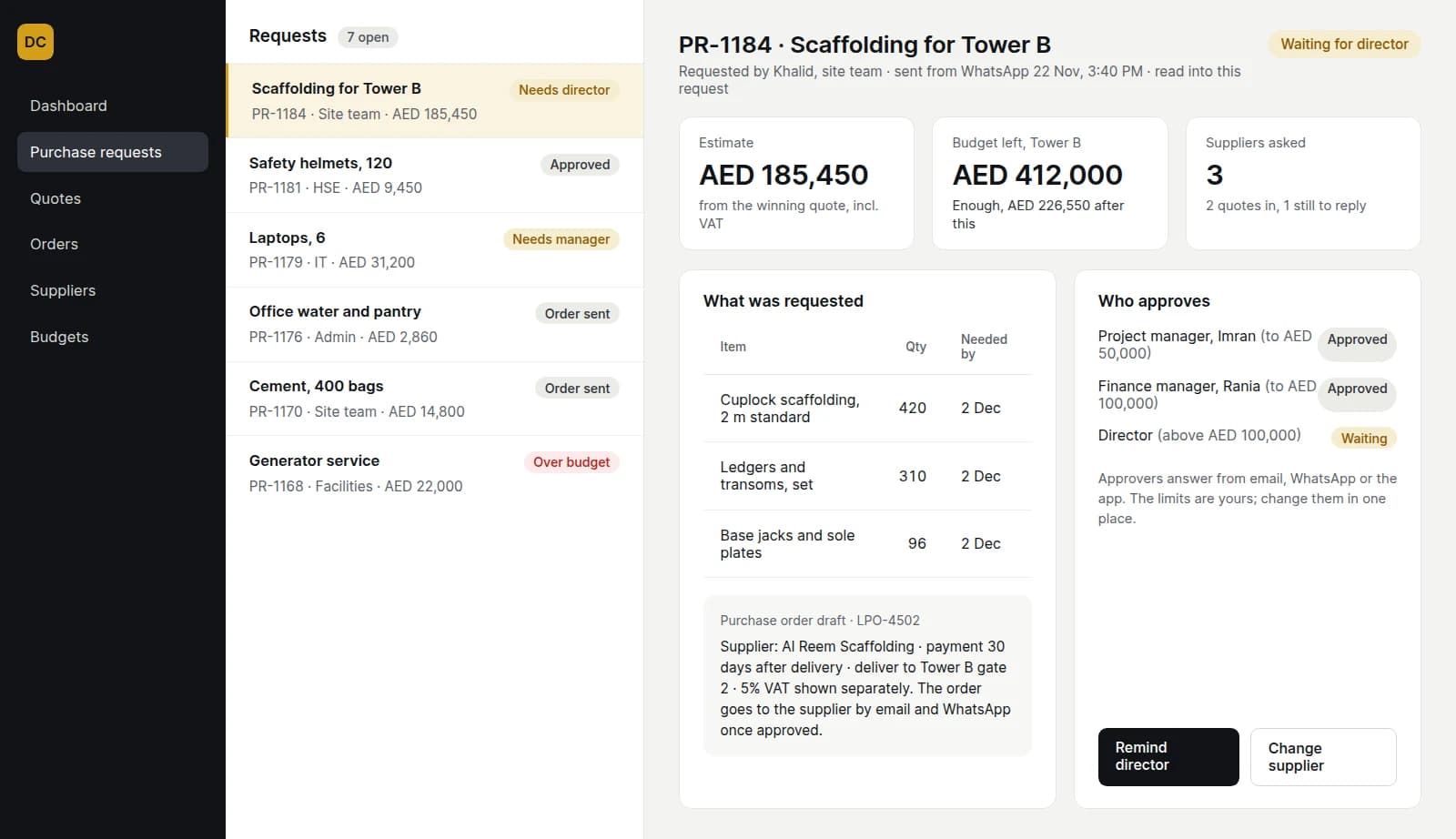
Staff ask for what they need in a short form or on WhatsApp. The system checks it against budget and your policy, routes it to the right approver by amount and issues the purchase order once it is approved.
- Checks budget, approved suppliers and your limits before it reaches anyone
- Routes by amount and department, and reminds approvers who are slow
- Issues the local purchase order with your numbering and keeps the trail
Sample build
A contractor's site team asks for scaffolding and cement through a form. The request goes to the project manager, then to finance because it passes AED 25,000, and the LPO reaches the supplier the same day it is approved.
Works with: Web form and WhatsApp, Zoho Books / Odoo / SAP Business One / Dynamics 365, Slack / Teams approvals, Audit log
Good fit: contractors, facilities and property groups, hospitality, healthcare, any team with several people buying
Supplier quote comparison
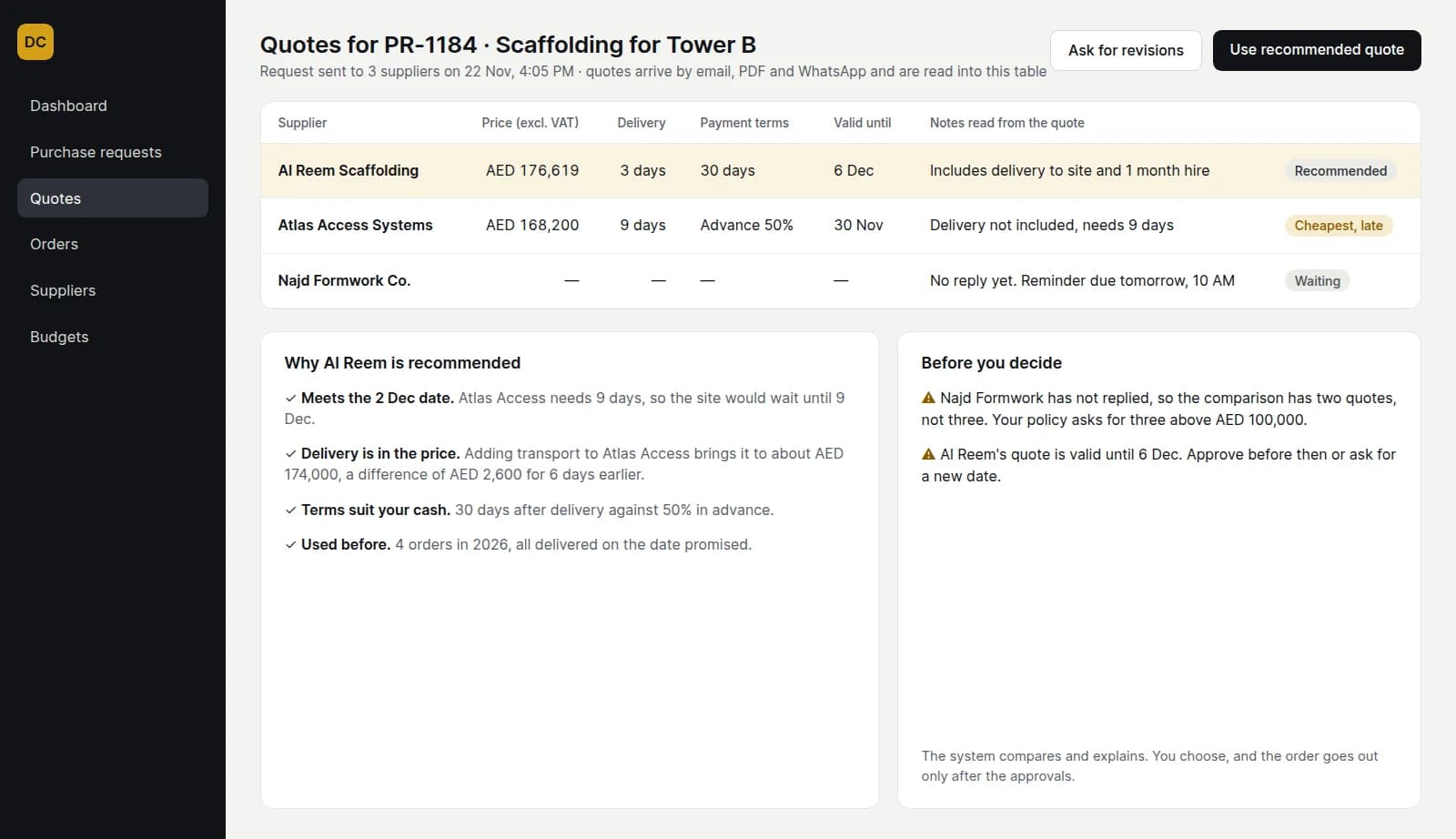
Sends your request to the suppliers you choose, reads the quotes that come back in any layout and puts them side by side on price, delivery time and terms. You pick, and the choice and the reason are kept.
- Requests quotes by email or WhatsApp and chases the ones that are missing
- Reads PDFs, spreadsheets and photos and lines the items up
- Shows total cost including delivery and VAT, so cheap and cheapest are not confused
Sample build
A hotel group asks four suppliers for kitchen equipment. Three send PDFs and one sends a photo. The comparison is ready the next morning, with a note that one quote leaves out delivery.
Works with: Email and WhatsApp, OCR and vision models, Google Sheets / Excel, Audit log
Good fit: hotels and restaurants, contractors, retail, any team that asks for three quotes
Three-way match for supplier invoices
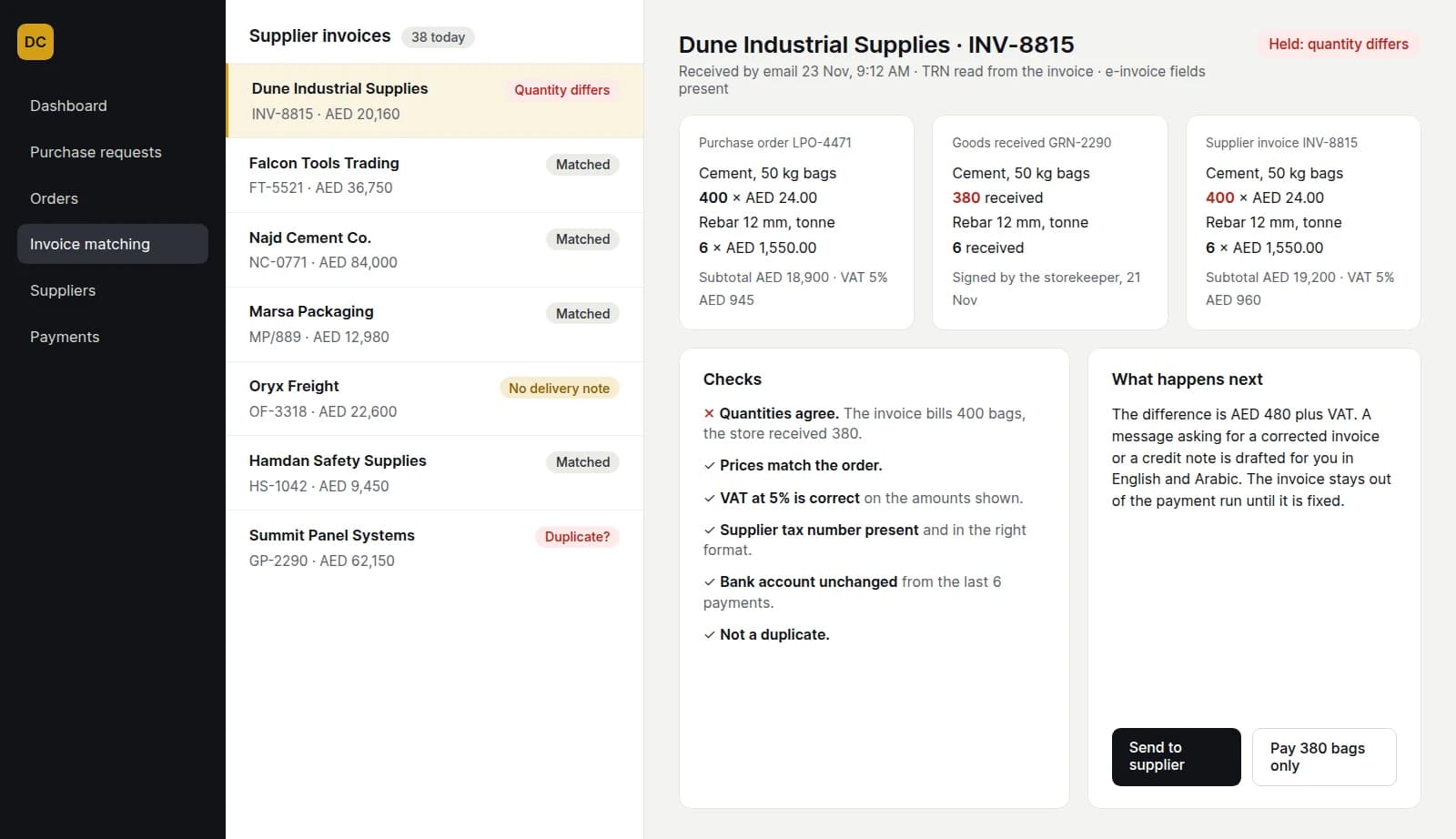
Checks each supplier invoice against the purchase order and the goods received note before anyone pays. It catches wrong quantities, changed prices, VAT mistakes, missing tax numbers, duplicates and changed bank details.
- Matches quantities, prices and totals across the three documents
- Checks VAT, the supplier's tax number and the invoice fields your country asks for
- Holds anything that does not match and tells the finance manager why
Sample build
An invoice bills 400 bags of cement and the store received 380. The system holds it, drafts a message in English and Arabic asking for a corrected invoice, and keeps it out of the payment run.
Works with: Email and WhatsApp inboxes, OCR and vision models, Zoho Books / Odoo / SAP Business One / Dynamics 365 / NetSuite, Audit log
Good fit: any business that pays suppliers for goods, from a few invoices a day to a few hundred
Supplier onboarding and documents
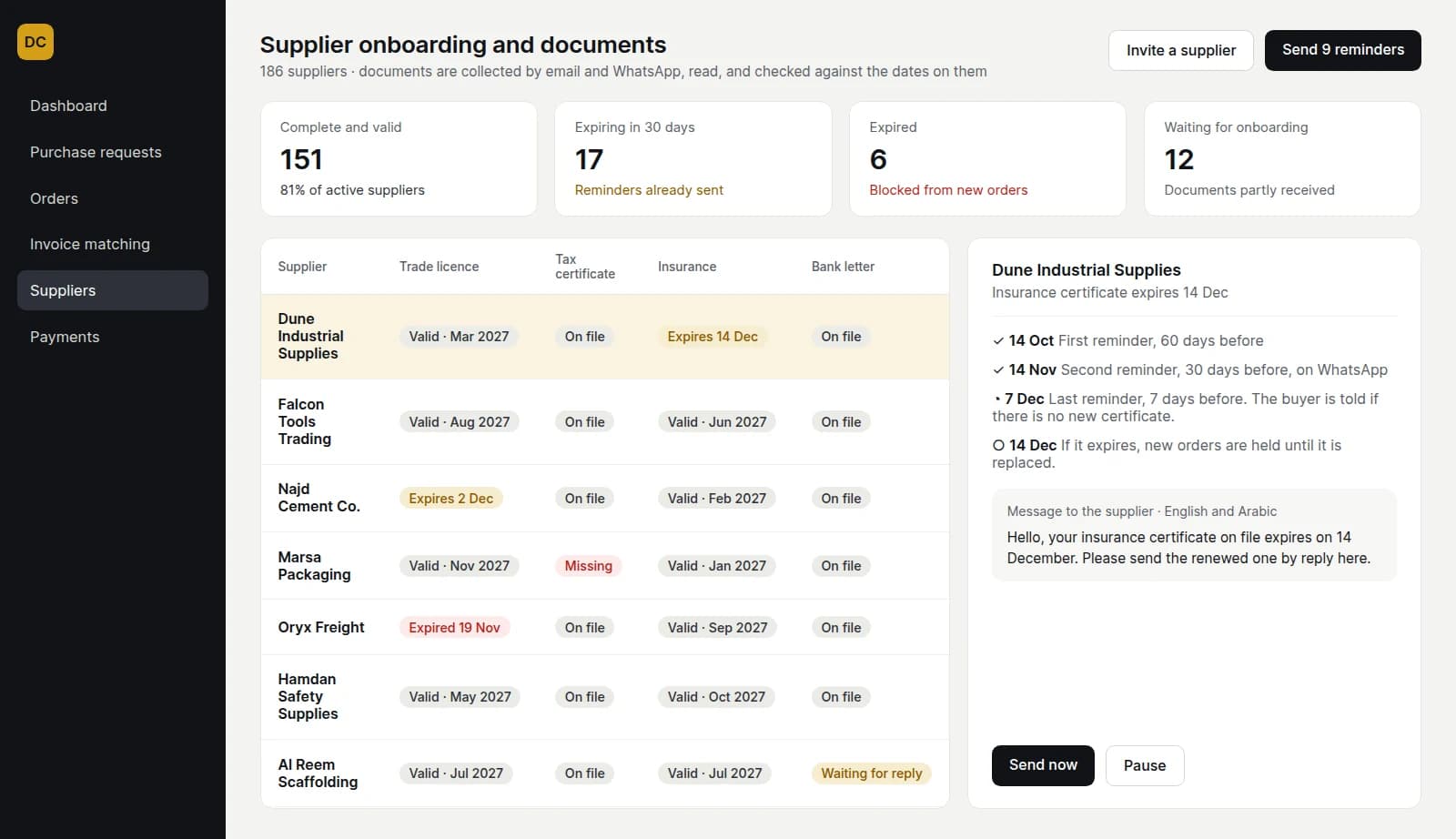
Collects the documents each new supplier needs, checks them, and chases renewals before they expire. Nobody is added to your payment list until the file is complete.
- Asks for the trade licence, tax certificate, bank letter and insurance
- Checks names, numbers and dates, and flags what does not agree
- Reminds suppliers before a licence or certificate runs out
Sample build
A distributor has 150 suppliers and no one knows whose trade licence has expired. The system lists 11 that expire this quarter, sends the reminders and blocks new orders for the two that lapsed.
Works with: Web form and email, OCR and vision models, Zoho Books / Odoo / SAP Business One / Dynamics 365, Reminders
Good fit: contractors, distributors, healthcare, government suppliers, any business with many suppliers
Four for finance teams
Money work is repetitive, exact and full of deadlines, which suits automation. These keep the books current and the cash coming in, with VAT handled the way your country asks and a person approving every payment.
Invoice follow-up and collections
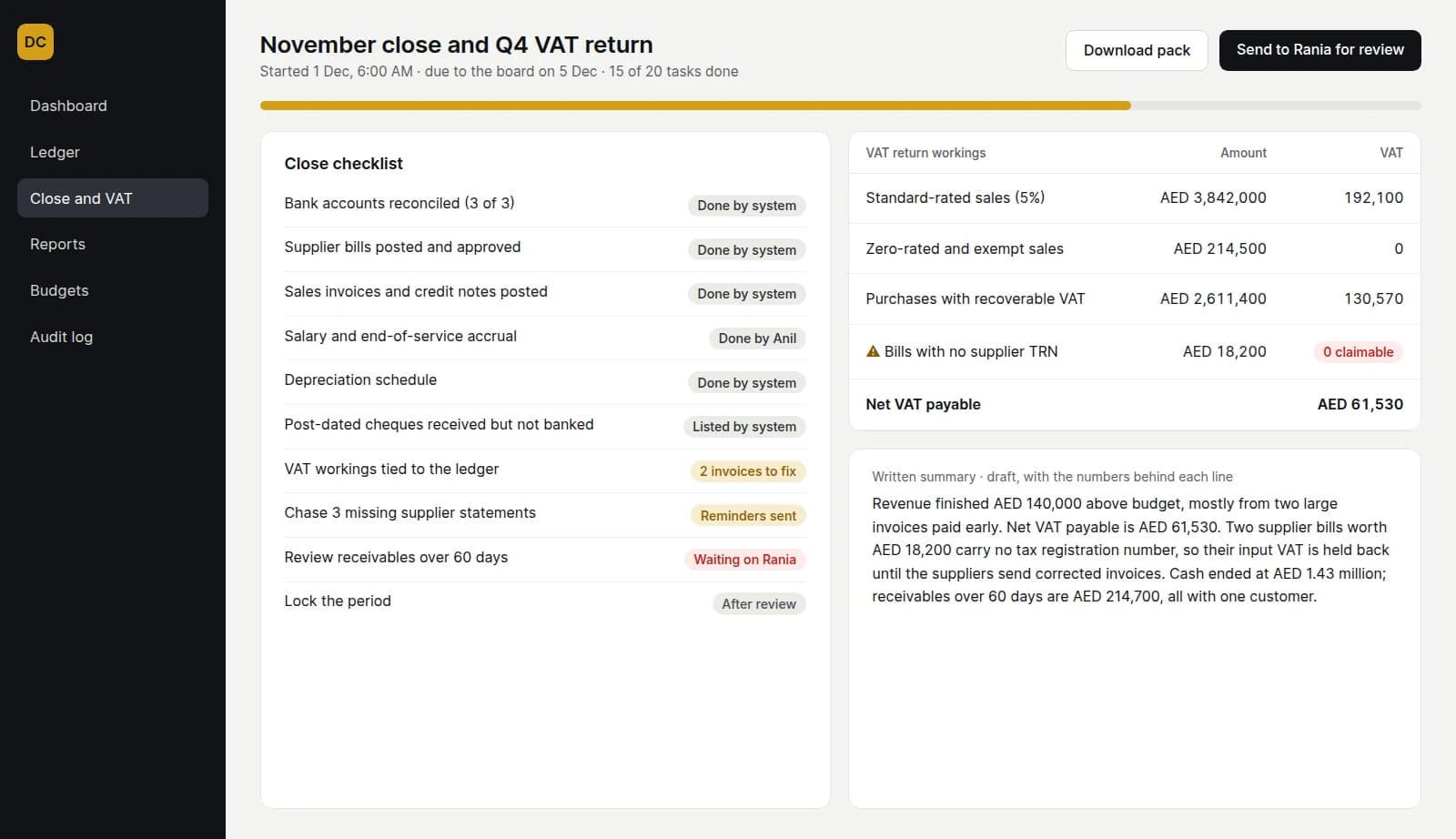
Chases overdue invoices on a schedule you set, by email and WhatsApp, in English or Arabic, with a payment link in every message. It logs promises to pay, checks on the day, and tells you when a customer needs a call instead.
- Sends reminders on the days you choose, in wording you approve
- Reads replies and tracks each promise to pay against its date, including post-dated cheques
- Passes anything past your limit to the owner, with the full history
Sample build
A distributor has 23 overdue invoices worth AED 186,000. The system sends the first reminders as invoices fall due, logs a customer's promise to pay on Thursday, and checks the bank that evening. The owner only hears about the few that need a call.
Works with: Zoho Books / Odoo / SAP Business One / QuickBooks / Wafeq, WhatsApp Business API, Email, Payment links
Good fit: distributors, contractors, agencies, any business that invoices on credit
Bank reconciliation
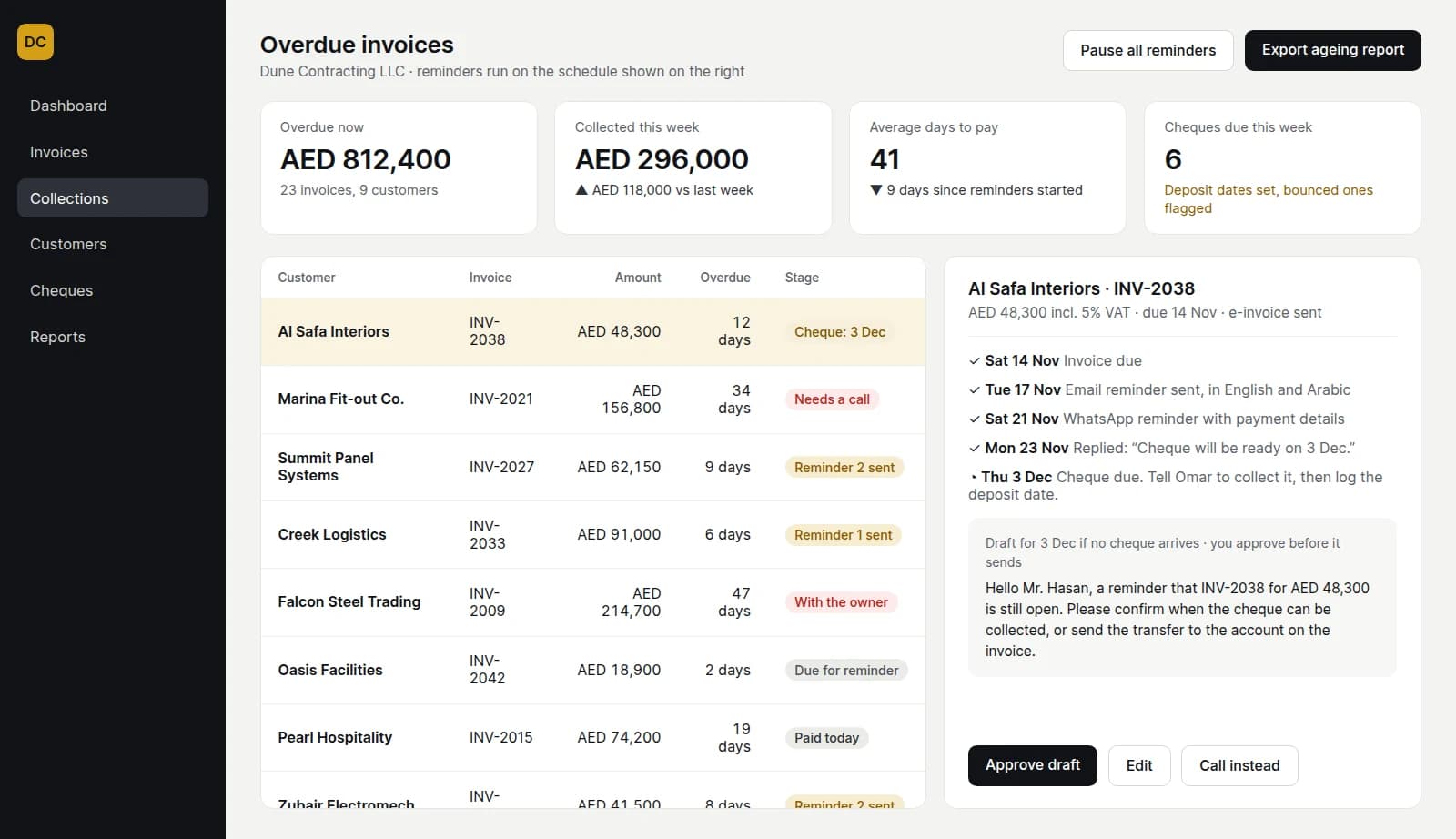
Matches every bank line to an invoice or bill by amount, reference and date, posts the exact matches, and lists the rest with a likely reason. You review a short list instead of a whole statement.
- Imports statements each morning from bank files or feeds
- Posts exact matches once you approve the batch
- Shows near matches with what differs, such as a bank fee, a cheque that has not cleared or swapped digits
Sample build
A firm with three bank accounts spent two days a month matching about 200 lines each. The system matches 198 of 214 lines on its own and leaves 16 with a suggestion, so the accountant checks 16 lines instead of 214.
Works with: Bank statement files, Zoho Books / Odoo / SAP Business One / QuickBooks / Xero, Google Sheets, Audit log
Good fit: accounting firms, finance teams, any business with several bank accounts
Payment approvals and payment runs
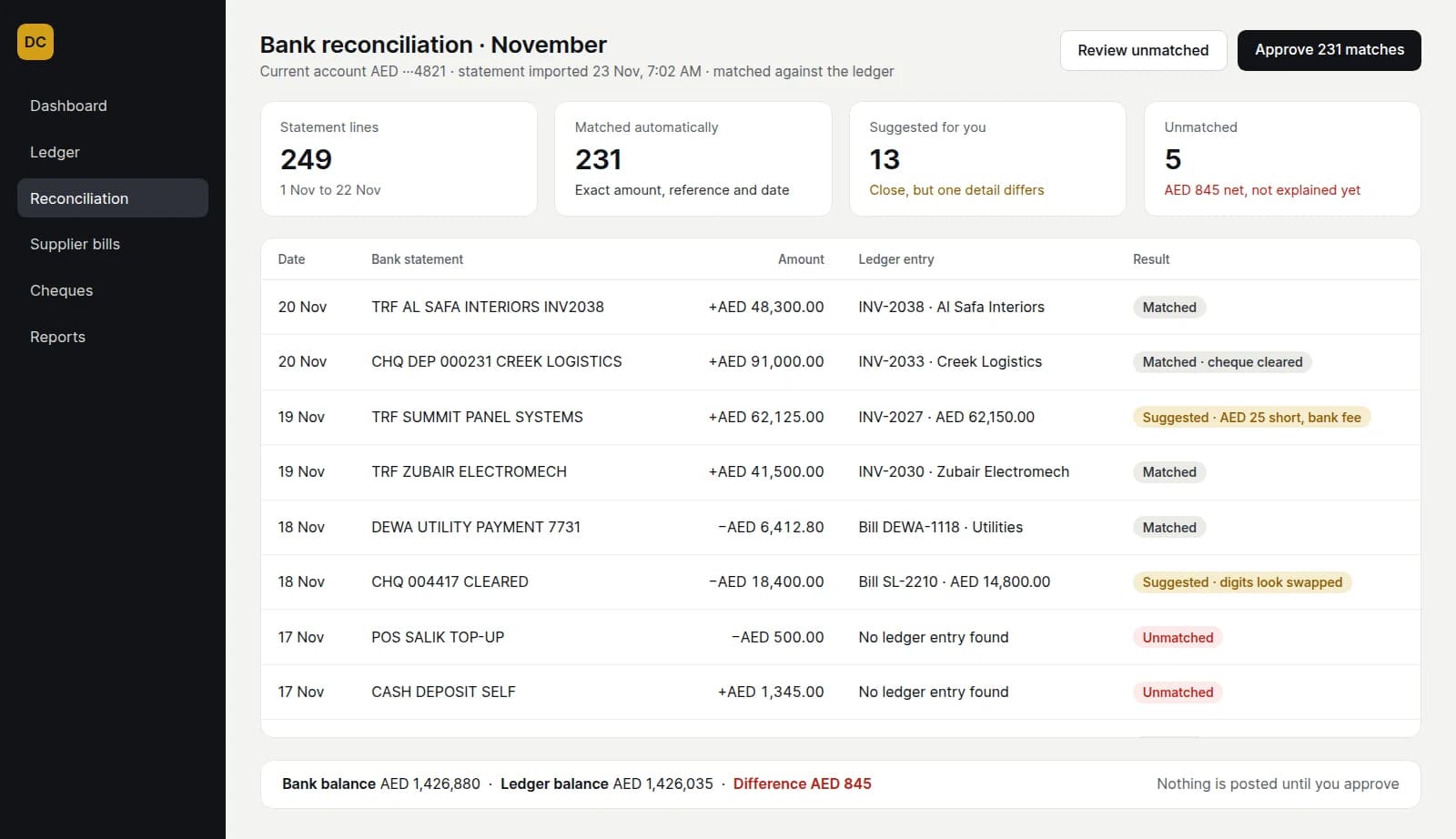
Collects the invoices that passed their checks into a payment run, sends it to the right approver for its size, and produces the bank file once it is approved. Nothing is paid without a person's approval.
- Builds the run from matched invoices, with due dates and cash on hand in view
- Flags changed bank details and duplicate invoices before any payment is made
- Routes by amount and logs who approved what
Sample build
Friday's run has 34 invoices worth AED 412,000. The system holds two for changed bank details, sends the rest to the finance manager and, above AED 100,000, to the owner too. The bank file is made only after both approve.
Works with: Zoho Books / Odoo / SAP Business One / Dynamics 365, Bank payment files, Slack / Teams approvals, Audit log
Good fit: any business paying more than a few suppliers a month, finance and operations teams
Month-end close and finance reports
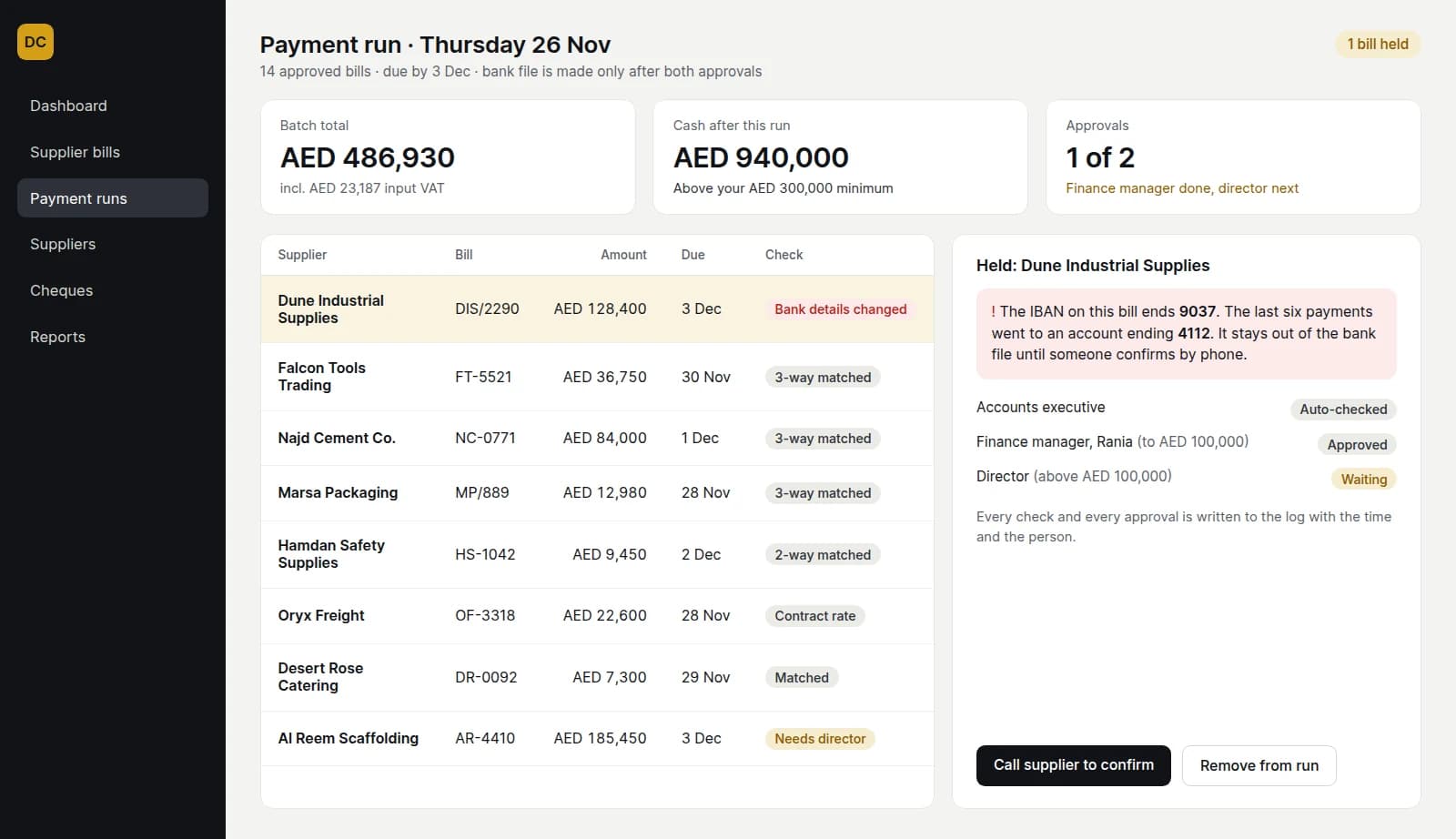
Runs the close checklist, does the steps that are the same every month, chases whatever is missing, and drafts the board pack with a plain-English summary of what moved against budget and why. It also prepares the VAT return figures for review.
- Tracks every close task and what is holding it up
- Compares actuals with budget and explains the large differences
- Drafts the pack for review; nothing goes out until a person sends it
Sample build
A 40-person company closes its books in five working days. The system finishes 14 of 19 tasks by the first morning, chases three missing supplier statements, and has a draft summary waiting for the finance manager.
Works with: Zoho Books / Odoo / SAP Business One / QuickBooks / Xero, Google Sheets / Excel, Payroll exports, Looker Studio
Good fit: finance teams, accounting firms, founders who do their own books
Eight systems most teams start with
Each one is a working pattern we adapt to your tools, your rules and your wording. Start with the one that costs you the most hours.
The screens on this page are sample builds with made-up names and data. They are not client results. We add real case studies only with written permission.
Instant lead follow-up
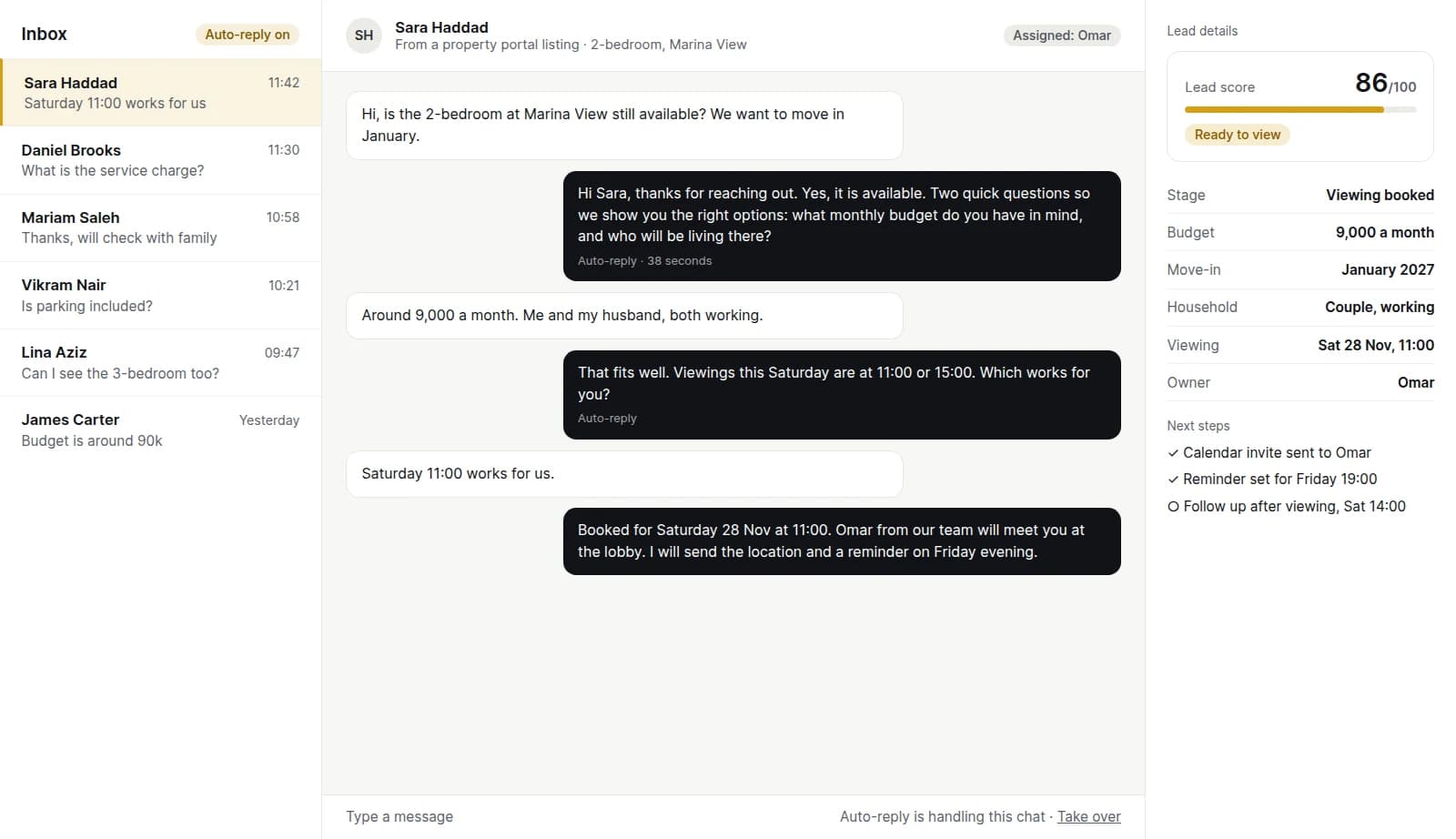
Replies to every new enquiry within a minute, day or night. It asks your qualifying questions, scores the lead, books a call with the right person and keeps following up until the lead answers or opts out.
- Captures leads from web forms, ads, portals, email and WhatsApp in one place
- Qualifies by budget, timeline and need, using your criteria
- Books straight into your calendar and updates your CRM
Sample build
A property agency gets 120 enquiries a week from three portals. The system answers each on WhatsApp, asks four questions and books viewings for the qualified ones. Agents only see leads that are ready to talk.
Works with: WhatsApp Business API, HubSpot / Zoho, Google Calendar, OpenAI / Claude, n8n
Good fit: real estate, recruitment, professional services, agencies
Candidate shortlisting
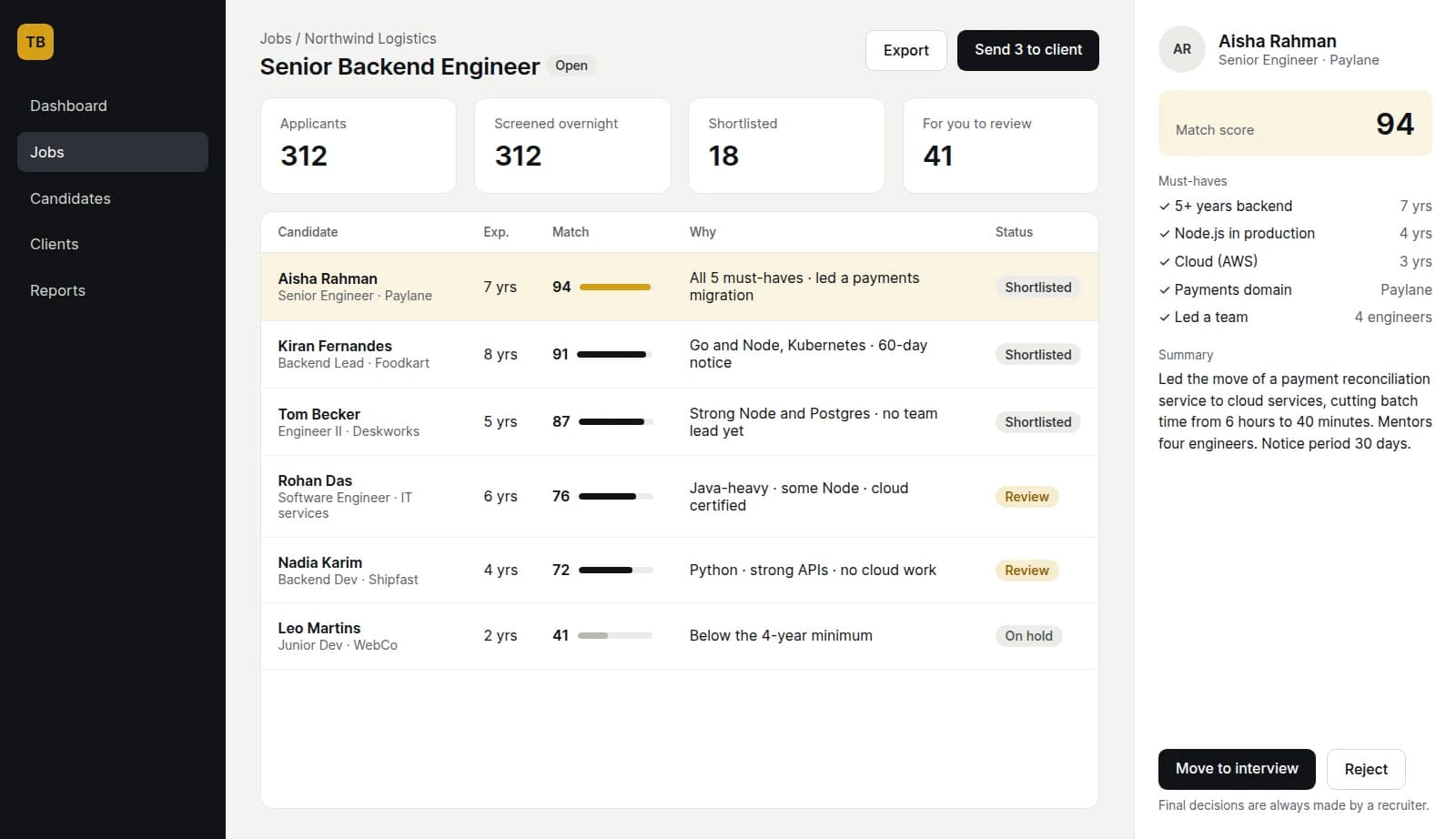
Reads every CV against the job description, scores each candidate on the must-haves, and writes a short, evidence-based summary into your applicant system. Recruiters review a ranked shortlist instead of a pile of PDFs.
- Scores against your criteria, with the reason for each score
- Flags gaps, notice periods and salary mismatches
- Never rejects anyone on its own: a recruiter makes every final call
Sample build
A six-recruiter staffing agency receives 300 applicants for a backend developer role. The system ranks them overnight, and the recruiter starts the morning with a top 20 and a one-line reason for each.
Works with: Bullhorn / JobAdder / RecruitCRM, Email parsing, Scoring rules, Audit log
Good fit: recruitment and staffing agencies, in-house HR teams
Smart scheduling
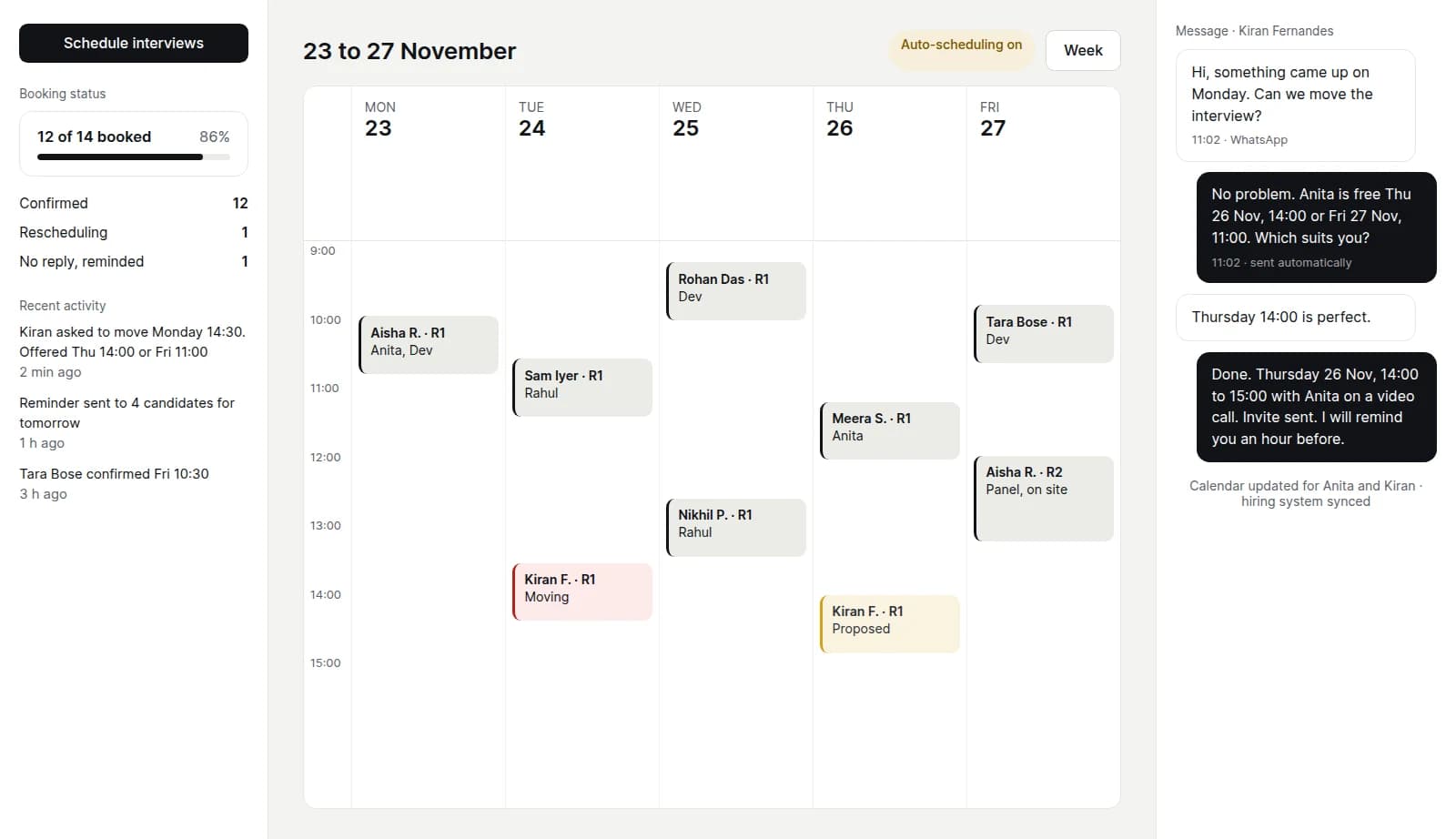
Coordinates interviews, site visits, calls and appointments in plain conversation. It finds a time that works for everyone, sends reminders, handles reschedules and rebooks no-shows, without anyone going back and forth.
- Reads real availability across several calendars
- Confirms by WhatsApp, SMS or email in the customer's language
- Chases no-shows and offers the next slot automatically
Sample build
A recruiter needs 14 first-round interviews across three hiring managers. The system messages each candidate, books slots that suit all sides and sends reminders a day before and an hour before.
Works with: Google / Outlook Calendar, WhatsApp and SMS, Calendly, OpenAI / Claude
Good fit: recruitment, real estate, consultancies, service businesses
Document data capture
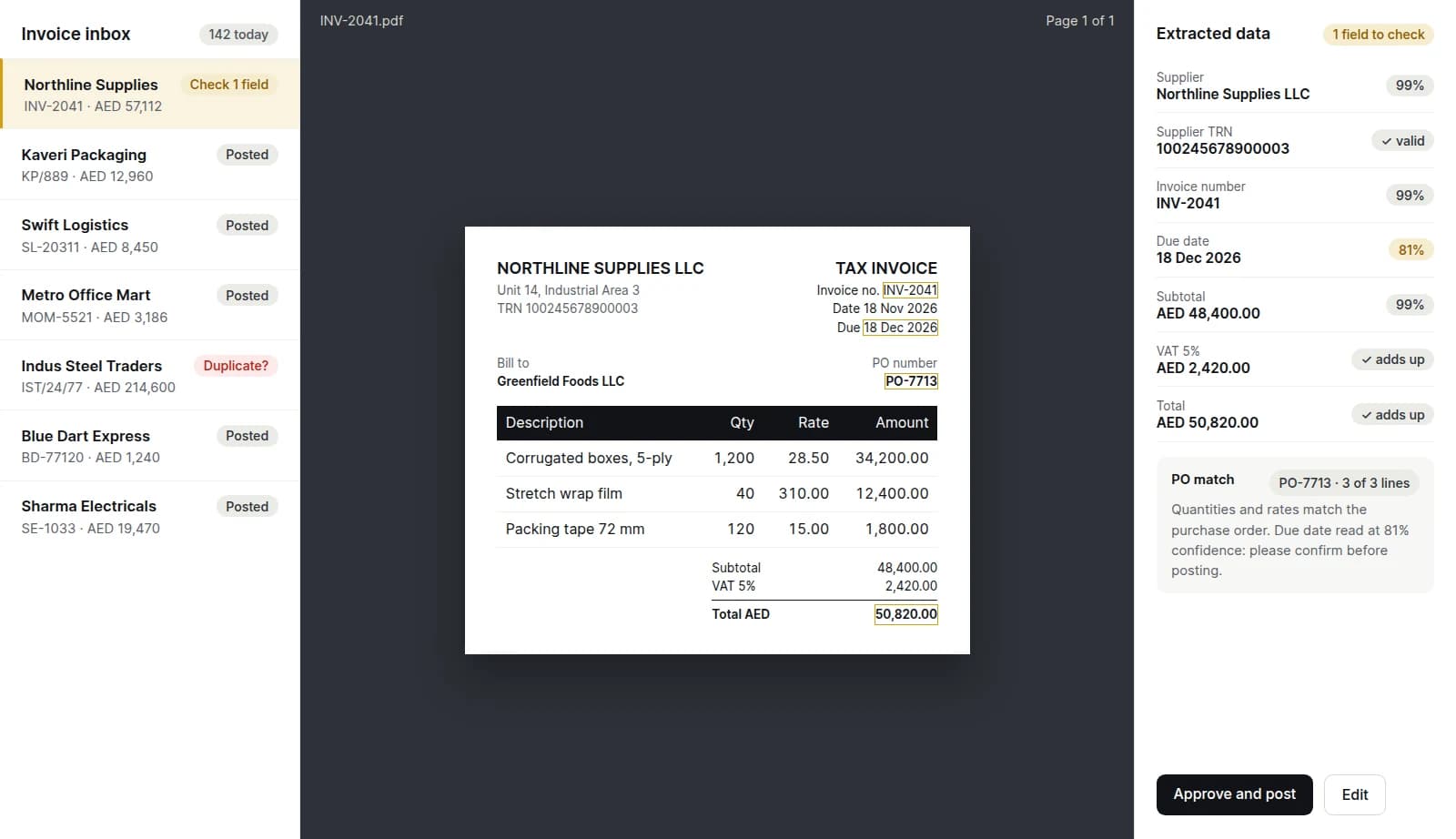
Turns invoices, purchase orders, contracts, IDs and forms into clean data in your systems. It reads scans and photos, checks the numbers, and only asks a person when it is not sure.
- Extracts fields from PDFs, scans, photos and email attachments
- Validates totals, dates and duplicates before anything is saved
- Shows a confidence score; low-confidence items go to a person
Sample build
A bookkeeping firm receives about 900 supplier invoices a month for its clients. The system extracts vendor, amount, tax and due date, matches each to the purchase order, and queues the 5% it cannot verify.
Works with: OCR and vision models, Google Drive / Email, QuickBooks / Tally / Xero, Review queue
Good fit: accounting firms, logistics, professional services
Inbox and WhatsApp triage
Sorts every incoming message by intent and urgency, answers the routine ones from your own knowledge base, drafts replies for the rest and sends anything urgent to the right person with a summary.
- One view for shared inboxes and WhatsApp numbers
- Answers common questions and order or status questions using your data
- Hands off to a person, with context, when it should
Sample build
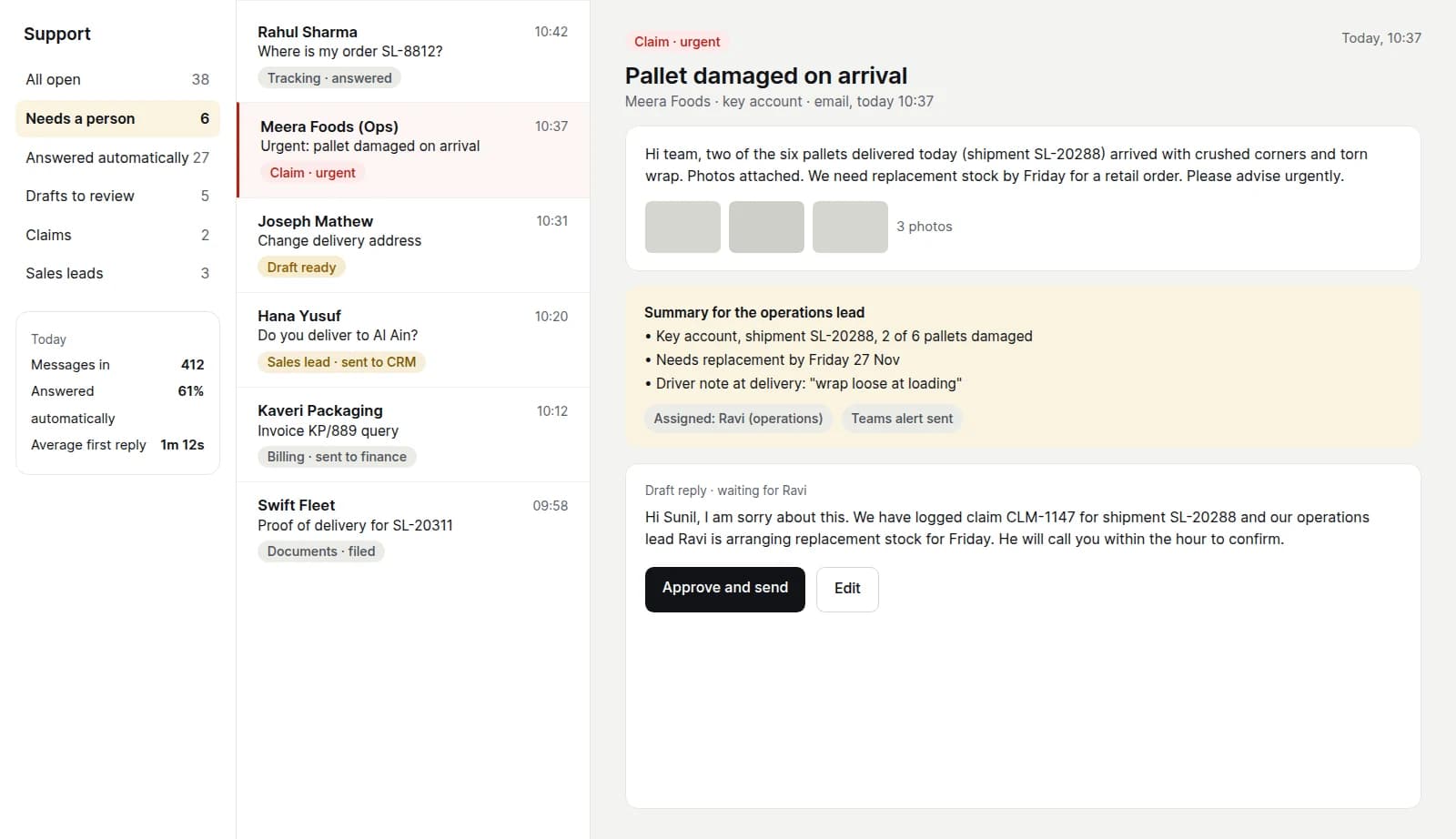
A logistics company's support inbox gets 400 messages a day. The system answers "where is my shipment" questions from the tracking system and routes damage claims to a manager with photos attached.
Works with: Gmail / Outlook, WhatsApp Business API, Knowledge base, OpenAI / Claude, Slack alerts
Good fit: logistics, e-commerce, agencies, any shared inbox
Automated reporting
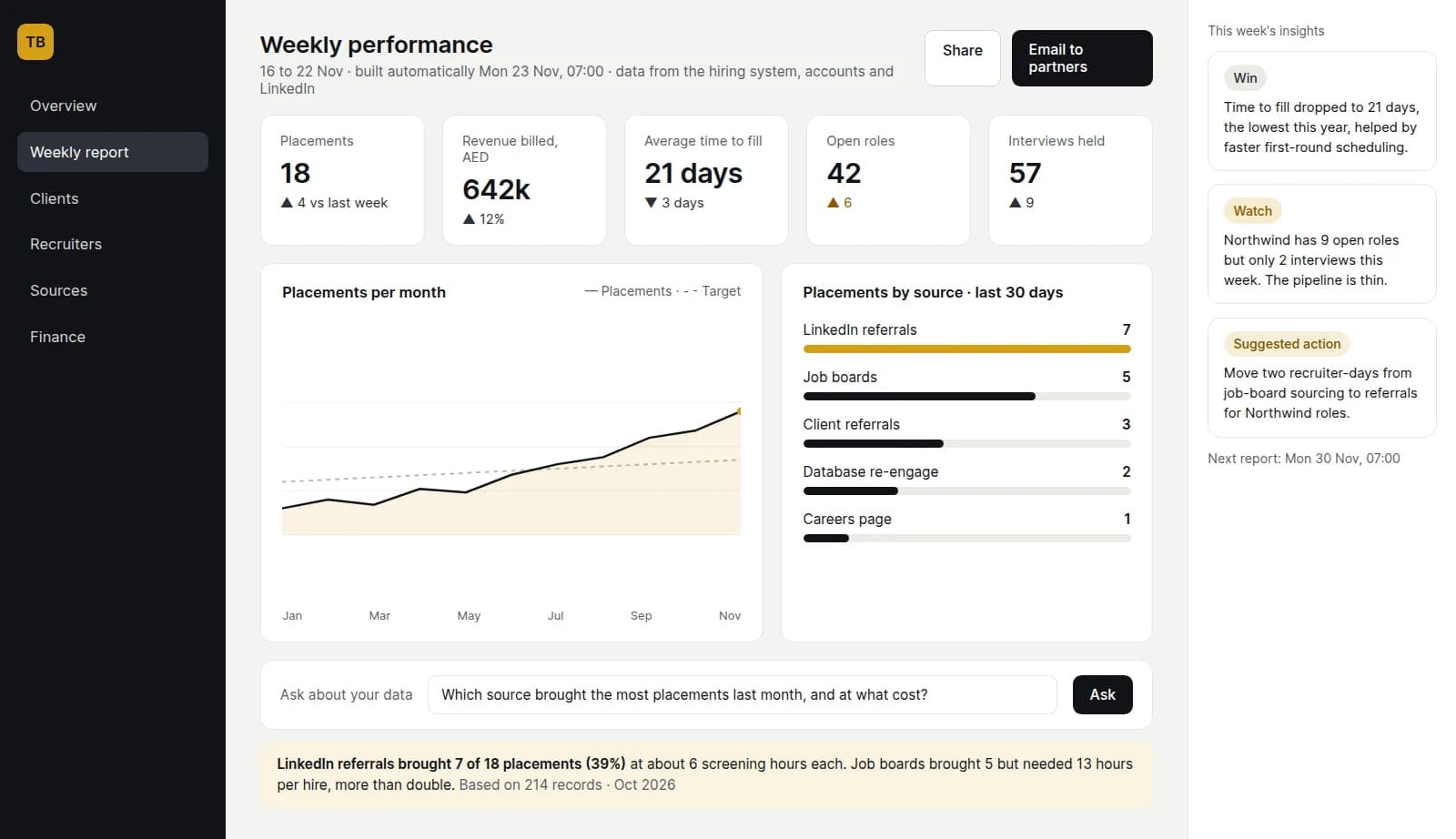
Pulls numbers from your CRM, accounts and spreadsheets into one live dashboard, writes the weekly summary for you, and answers questions in plain English, such as which source brought the most placements last month.
- Connects your tools into one source of truth
- Sends a written weekly report to leadership or clients
- Answers plain-English questions with the numbers behind the answer
Sample build
An agency owner spends every Monday building a client report from four tools. The system builds it at 7 AM and adds three plain-English insights and one recommended action.
Works with: Google Sheets / BigQuery, CRM and accounting APIs, Looker Studio, OpenAI / Claude
Good fit: agencies, recruitment, accounting, operations teams
Back-office automation
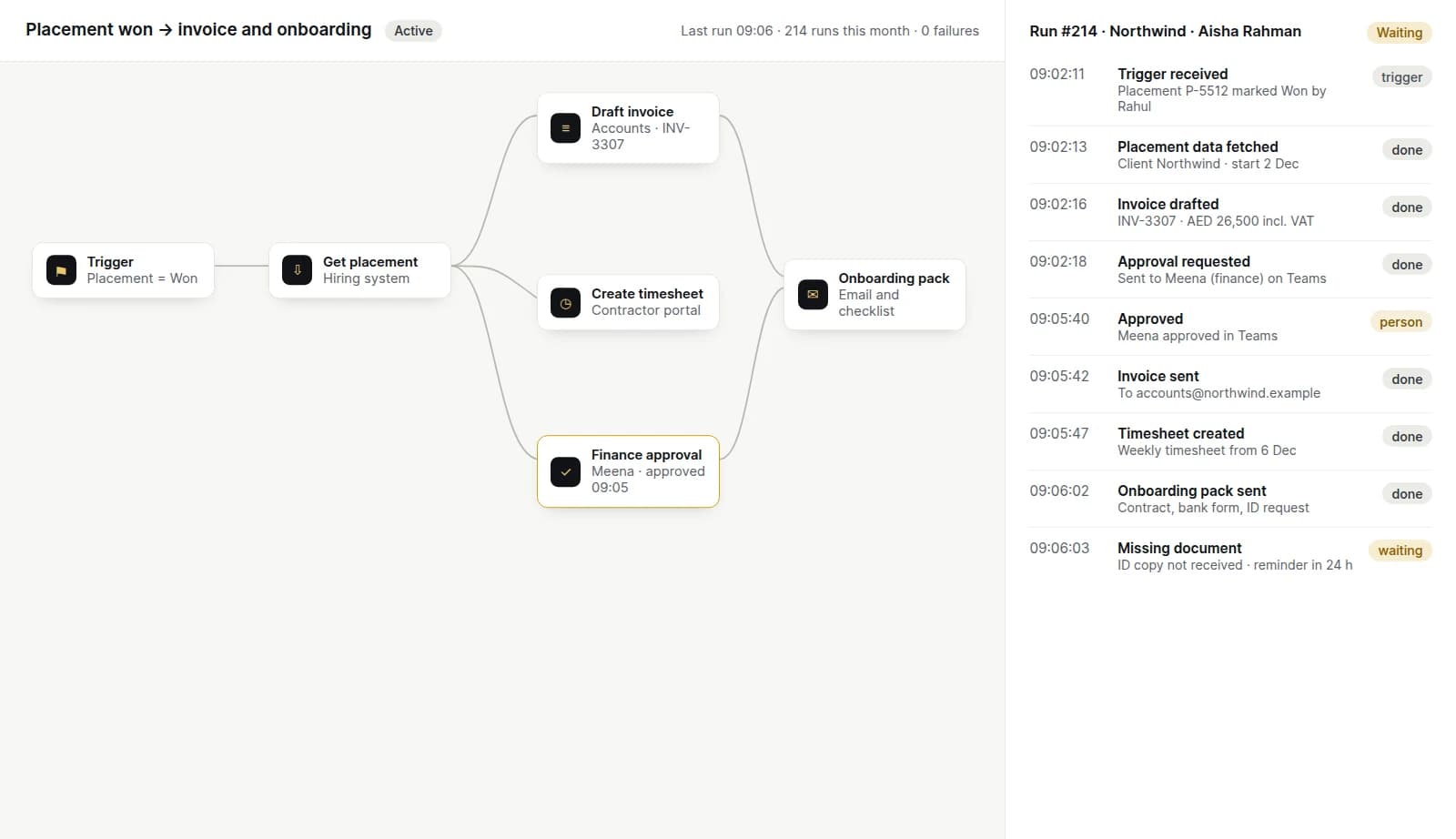
Does the repetitive admin that moves data between your tools: creating invoices, updating records, onboarding clients and staff, chasing missing paperwork. Every step is logged so you can see exactly what ran.
- Moves data between CRM, accounts, HR and spreadsheets
- Runs onboarding checklists and chases missing items
- Keeps a full log of every action, with who approved it
Sample build
When a staffing agency marks a placement as won, the system creates the client invoice, sets up the contractor's timesheet, sends the onboarding pack and reminds them about missing documents.
Works with: n8n / Make, QuickBooks / Zoho Books, Google Workspace, Audit log
Good fit: staffing, accounting, logistics, any team buried in admin
Internal knowledge assistant
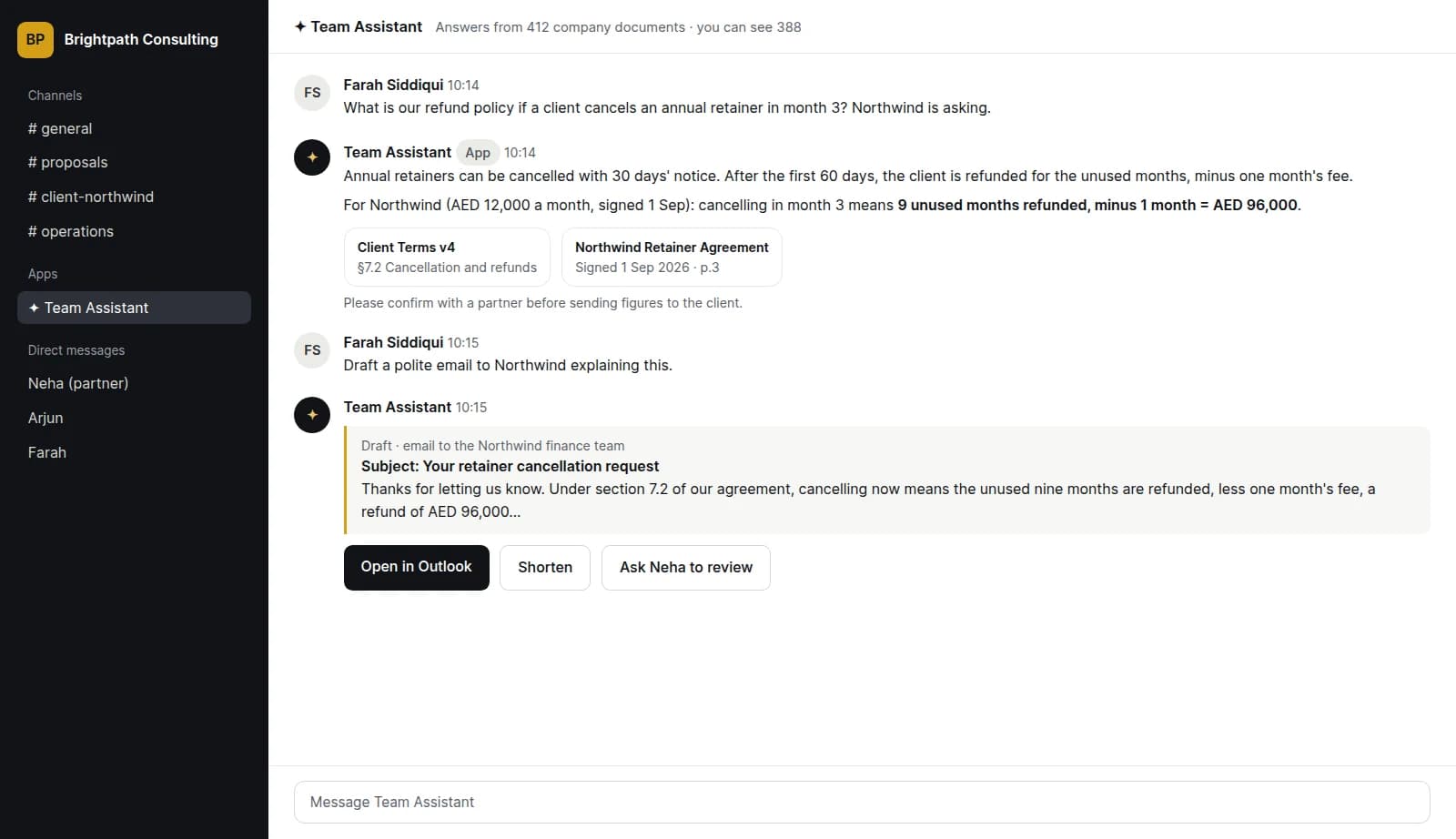
An assistant that knows your business: your procedures, price lists, past proposals and client history. Your team asks it questions, drafts proposals and checks policy, and every answer points to the document it came from.
- Answers from your own documents, with sources
- Role-based access: people see only what they are allowed to
- Lives where your team works: web, Slack or Teams
Sample build
A consultancy's new hires keep asking seniors the same questions. The assistant answers from 400 internal documents and drafts first-pass proposals from past winning ones.
Works with: Search over your documents, Google Drive / SharePoint, Slack / Teams, Access control
Good fit: consultancies, agencies, accounting and legal teams
Custom software, built around how your business works
The systems above are where most teams start. Many businesses need something no off-the-shelf tool does well: a portal for their clients, an app for their field team, or one platform that replaces five spreadsheets. We design, build and run it for you, and you own the code.
Web apps and platforms
Operations platforms, marketplaces and SaaS products, from first version to production.
Client and partner portals
Let customers, vendors or agents log in to track orders, upload documents and see status.
Mobile apps
iOS and Android apps for customers or field teams, with offline mode where it matters.
Internal tools and dashboards
Admin panels, approval flows and back-office tools your team actually enjoys using.
Finance and procurement software
Billing, ledgers, purchasing, lending and payout tools, and customer onboarding with identity checks, built with approvals and audit trails from the start.
Integrations and APIs
Connect your CRM, accounts, ERP and payment systems so data flows without copy and paste.
Modernising old systems
Move off fragile legacy software or spreadsheets step by step, without stopping the business.
MVPs for new products
Turn an idea into a working product you can sell, built to grow rather than be rebuilt.
Rescue and hardening
Already have an app that is slow, buggy or insecure? We fix it before we build on it. That work is called Vibe-fix.
See Vibe-fix
How a custom build runs
Discover
We map the process, the users and the numbers that matter. You get a written scope and a quote.
Design
Clickable screens you can test with your team before any code is written.
Build
Releases you can see and use as it grows. No disappearing for months.
Run
Monitoring, fixes and improvements after launch, if you want us to keep looking after it.
Have a problem that is not on this page?
Tell us what is slowing your team down. We will reply with how we would approach it.
Vibe-fix: for apps built with AI tools
Apps made with Lovable, Bolt, Cursor, Replit or v0 get you to launch fast and often leave gaps in security and reliability. These are the five steps, from a free look to ongoing care.
Free website scan
We check your live site in about a minute and email you a graded report, before anyone pays anything.
Best for
Anyone with a live site who wants to know where they stand.
Included
- Nine groups of checks: HTTPS, security headers, secrets in your frontend, exposed files, API structure, rate limits, email and DNS, Supabase and Firebase, and old libraries
- A graded report by email
- Read-only. It never logs in, submits forms or changes anything
Rescue Audit
Christmas offer: the audit is free until 31 December 2026. See the terms
A person reads your code and your setup, and tells you what is broken or unsafe, in order of risk.
Best for
Founders who want a written answer they can act on, or hand to a developer.
Included
- A written report of every finding, worst first
- A suggested fix for each one, with the code change where there is one
- A 20-minute walkthrough call
- Read-only access, removed when we hand over
Best for
Teams that have a list of problems and no time, or no one, to fix them.
Included
- Fixes for the critical issues
- Tests and alerts so they stay fixed
- Handover notes your own developers can follow
Typical work
- Turning on row level security and writing the policies
- Moving secret keys to the server
- Making payment webhooks verified and safe to retry
- Fixing sign-in redirects and session checks
- Adding error alerts and backups
Rescue Care
We keep watching after launch and fix what comes up, so new prompts do not quietly bring old problems back.
Best for
Apps with real users that nobody on your side has time to watch.
Included
- Monitoring and alerts
- Monthly fixes and updates
- Cancel anytime
Advanced AI monitoring
An AI watches your app all the time and tells you in plain words what broke and why. Our team handles the support and maintenance that follows.
Best for
Apps with paying users, where a silent failure costs real money.
Included
- Everything in Rescue Care, including monthly fixes and updates
- AI watching errors, uptime, payments and sign-in
- Alerts in plain words, with the likely cause and where to look
- A check after every update, so a new prompt cannot quietly bring an old problem back
- Support by email for you and your team
- Maintenance: updates, backups checked, and fixes for what the monitoring finds
- A short monthly summary of what happened and what we did
Not sure where to start?
Describe one task your team repeats every week, or tell us what worries you about your app. We will say which service fits and what it would need.
or write to [email protected]
Common questions
- What is an automation audit?
- A working session where we map where your team's hours go, pick the one or two processes worth automating first, and tell you what we would build and what it would need. You decide what to do with it.
- Do you handle VAT and e-invoicing?
- We build the checks your finance team already applies: the tax number is present, the VAT rate and totals are right and the invoice has the fields the rules ask for. We do not file your returns and we are not an accredited e-invoicing provider, so we work alongside yours.
- How do you handle finance data?
- We ask for the least access that works, use read-only access where we can, keep keys in your own accounts and log every action the system takes.
- Who owns what you build?
- You do. It runs in your accounts, you hold the keys and the code, and you can switch us off at any time.
- Do you need our code?
- Read-only access to your code. We remove it when we hand over.
- Will you tell us to rebuild?
- Almost never. We fix what you have.
- Which tools do you work with?
- Lovable, Bolt, Cursor, Replit and v0, and the Supabase, Firebase, Stripe and Vercel setups they usually produce.